
Your Facebook activity reveals a lot of information about you which is generally more than what you have thought about. Your likes, comments, friend request and your onine activity including Facebook are shared as your activity and you may not want other users or friends to see that. It is very important for you to control what other users can see about your profile for better privacy and security of your account in 2025.
If you are also looking to hide your Facebook activity from friends or the other users, you can achieve the same by making certain changes to your account settings., there are several settings you can adjust. In this post, we’ll guide you on how to hide your activity on Facebook and stop Facebook friends from seeing them across iPhone, Android, and desktop in 2025 with the quick step by step process.
Why Should You Hide Your Facebook Activity?
Your account activity on Facebook says a lot about your account as it does shares your information with other users, hence it is important for you to hide your facebook activity to limit your visibility of your account, keep your actions on Facebook private and control your account privacy.
- Prevent others from seeing your likes, comments, and reactions on Facebook
- Stop users from seeing for information and actions on Facebook
- Prevent peoople from questioning about your Facebook activity online
- Control account privacy and limit who can see your activities and posts
How to Hide Your Facebook Activity From Your Friends
Step 1: Open the Facebook app on your phone or Facebook website.
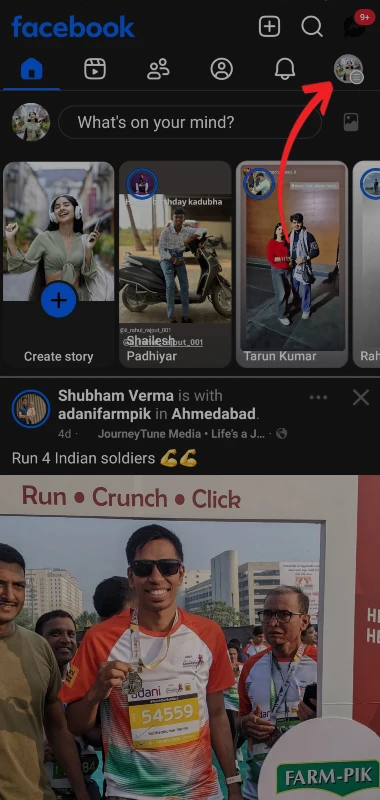
Step 2: Tap on the Menu (☰) icon on the profile page.
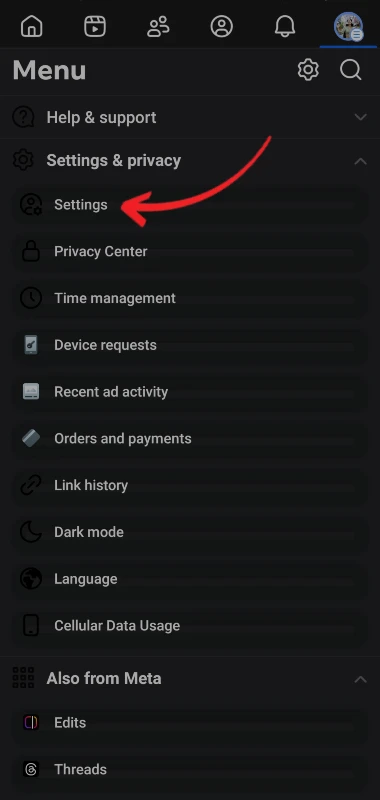
Step 3: Go to Settings & Privacy from the menu page and select Settings.
Step 4: From the available settings scroll down to Audience and visibility.
Step 5: Select Followers and public content and set activity visibility to Friends or Only me.
Step 6: Go to the Activity log under Your Activity tab and check your activities on Facebook.
Step 7: Apply Filters to hide your activities and delete likes, comments, and reactions on the previous posts.
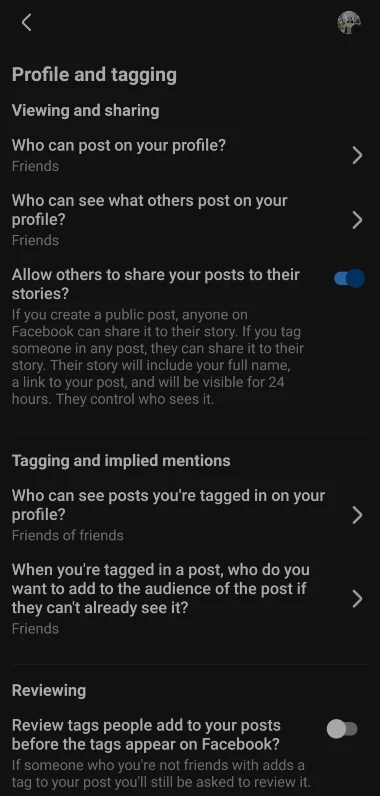
Step 8: Hide the posts that your are tagged in from the profile and tagging option by setting it to Only me.
Step 9: Turn off Show when you’re active from the Active Status tab.
Step 10: Limit who can see your interactions from the Reels and short videos settings.
Additional Privacy Controls for your Facebook Account
In addition to hiding your account activity of your Facebook account, you can consider the following privacy settings to control your privacy.
- Go to your future posts option and set it to Friends or Only me. This would help limit your future posts and activies being shown to unknown users.
- Go to Limit Past Posts and prevent users from seeing it in privacy settings. With this setting, you can restrict individuals from seeing your preveious post interactions.
- Do not let the activities about your account being shown to others because when activities are shown to other users a lot of question may arise about your activity.
- Restrict, Block or unfriend friends if as per the requirement using the Restricted list. Restricting users is a good way to restrict other users from seeing your posts and also the posts of other users won’t be shown to you without blocking or unfriending them.
- Do not like public posts if you don’t want to make your activites public. When you like other posts, you would start getting post recommendations and also other users would be able to see that tou have liked the post.
Conclusion
You can control your Facebook privacy and have a private online presence on Facebook by hiding your activities on Facebook and controlling the same. In addition to this, you can make changes to the audience settings on Facebook, disable the Activity Status and review your Activity log so that you can reduce your account visibility and have a safe and private account experience on Facebook. The steps mentioned in this posts, would help you to stop your friends from seeing your account activity on Facebook and hide it from others to make your browsing on Facebook in 2025..